








Choosing the right Embedded Pc begins with understanding the environment, not chasing the newest processor. A machine beside a cutting line faces vibration, dust, heat, and unexpected power changes. A medical workstation may demand quiet operation, stable performance, and carefully documented compliance. These conditions shape the correct design.
In practical deployments, small details often decide success. A fanless Embedded Pc can reduce dust intake, but it may need a larger heat sink. More USB ports seem useful, yet they can increase power demands and maintenance points. Field engineers should check operating temperature, mounting space, storage endurance, network interfaces, and long-term product availability. Start with the workload.
Define the software, display output, response time, and expansion requirements. Then compare processor performance with realistic application tests. Synthetic benchmarks alone can mislead. Review technical datasheets, manufacturer support policies, independent testing, and feedback from experienced system integrators. Ask how the computer behaves after months of continuous operation, not only during a showroom demonstration.
A careful choice also considers remote management, replacement planning, and security updates. These factors can reduce downtime and protect the total investment. Still, no selection method is perfect. A device that performs well in a laboratory may struggle inside a sealed cabinet under summer heat. This guide examines the practical questions behind each specification, helping you balance performance, reliability, cost, and future flexibility. The goal is simple: choose an Embedded Pc that fits the real application, not merely the product brochure.
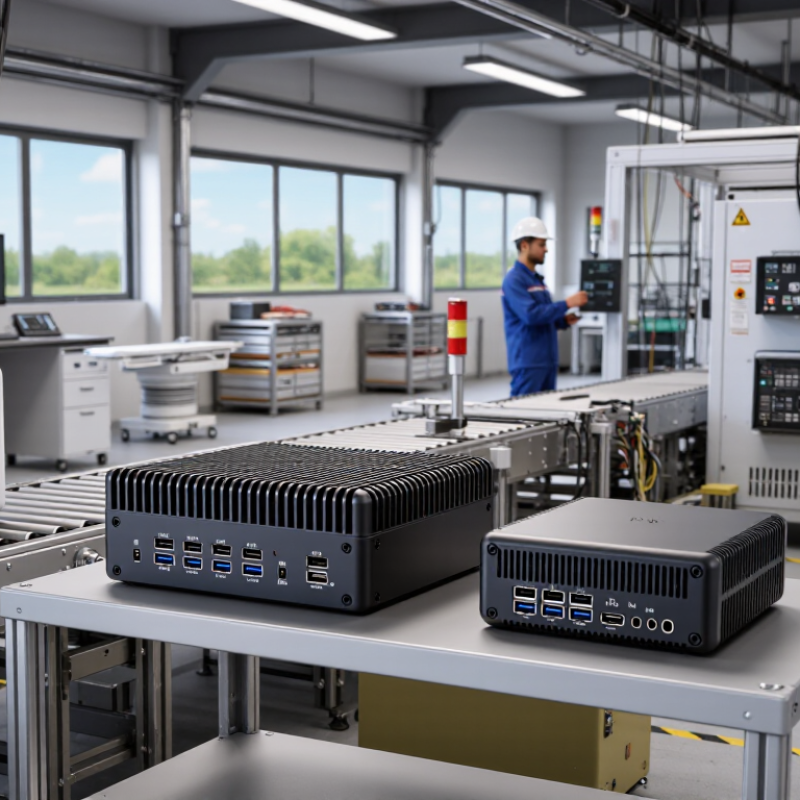
Choosing the best embedded PC starts with the application, not the processor. Define what the system must do every minute. A machine-vision station may need fast image processing, while a control panel may prioritize stable I/O and long service life. Record required ports, display outputs, storage capacity, network speed, and expansion options. Include peak workloads, not only average workloads. A five-second delay can disrupt an automated line.
Operating conditions often decide reliability. Measure the real temperature around the computer, including heat from nearby motors and enclosures. Check vibration, dust, moisture, altitude, and available airflow. A fanless design can reduce maintenance, but it may throttle under sustained heat. I once treated an enclosure temperature as room temperature. That assumption was wrong. Test the complete assembly at its worst expected conditions. Confirm input voltage tolerance, power interruptions, mounting space, and cable clearance before selecting hardware. Plan for the operating system, security updates, remote diagnostics, and spare units throughout the expected service period.
Tips: Write a short requirement sheet before comparing specifications. Mark each requirement as essential, preferred, or uncertain. Allow thermal headroom instead of matching performance exactly. Test with real sensors, cameras, and cables. Ask whether the computer can remain available for several years. That matters. Document every assumption, because overlooked details usually become the most expensive ones.
Define the application workload and operating conditions before selecting an embedded PC. The chart shows practical baseline requirements for common deployment profiles; actual specifications should be validated against software, peripherals, uptime, and environmental constraints.
Planning baseline: RAM and storage values are shown in gigabytes, while CPU capacity is represented by physical cores. Industrial deployments may also require extended-temperature components, fanless cooling, vibration resistance, and appropriate ingress protection.
Choosing the best embedded PC starts with its physical environment. Measure the available space, mounting points, airflow, and cable routes before comparing processors. A compact box fits inside a control cabinet, while a rugged panel-mounted unit suits exposed industrial stations. Rack-mounted systems offer easier service access but consume more space. Size matters.
Performance should match the workload, not a wish list. A dual-core processor may handle data logging and simple control tasks efficiently. Vision inspection, local analytics, or several virtual machines need more cores, memory, and faster storage. Check sustained performance, not only peak benchmark scores. Thermal throttling can appear after hours inside a warm cabinet. Fanless designs reduce moving parts, but they may sacrifice performance under continuous loads.
Expansion options often decide whether a system remains useful five years later. Review the number of serial ports, network interfaces, USB connections, digital inputs, and display outputs. PCIe or M.2 slots can support specialized capture, storage, or communication modules. Leave one expansion path unused if possible. It provides breathing room for changing requirements. A common mistake is choosing a small enclosure and adding external adapters later. That approach increases cable clutter and possible failure points. Still, more expansion is not automatically better; unused interfaces add cost and can complicate maintenance. Verify operating temperature ratings, memory limits, storage endurance, and supplier support in the technical documentation. Then test the chosen configuration with real software, real sensors, and realistic heat.
How to Choose the Best Embedded PC for Your Needs?
Evaluate Processor, Memory, Storage, and Operating System Compatibility
Choosing an embedded PC starts with the workload, not the processor label. A control cabinet collecting sensor readings needs different power than a vision system processing images. Measure the application’s peak demand, response time, and continuous operating hours. Processor speed alone can mislead. During field testing, I compare real workloads, not only published benchmarks. A dual-core unit may handle basic monitoring, while multi-core processing suits analytics or machine vision.
Memory affects stability when several services run together. Leave practical headroom for updates, background logging, and unexpected data spikes. Eight gigabytes may be enough for a simple interface, but heavier software can require more. Storage also deserves careful attention. Solid-state storage usually tolerates vibration better than mechanical drives. Check write endurance, temperature ratings, and recovery procedures. A small data partition can fill quickly. I have seen reliable systems fail because storage capacity was underestimated.
Operating system compatibility should be verified before purchase. Confirm driver support, processor architecture, update policies, and required development tools. Some applications depend on specific kernels, runtimes, or security features. Test startup time and peripheral communication on the actual operating system. Do not assume compatibility. It is worth testing. Fanless designs can simplify maintenance, but thermal throttling may appear inside a sealed enclosure. Review airflow, ambient temperature, and installation direction. My early estimates have sometimes been too optimistic, so I now validate performance under heat, load, and repeated restarts.
| Application Profile | Processor Recommendation | CPU Cores / Threads | Typical TDP | Recommended Memory | Storage Configuration | Operating System Compatibility | Expansion and Connectivity Needs | Environmental Considerations | Selection Priority |
|---|---|---|---|---|---|---|---|---|---|
| Basic Monitoring and Control Simple HMI, sensor gateways, data logging | Low-power 64-bit x86 or ARM processor with hardware virtualization optional | 2–4 cores / 2–4 threads | 6–15 W | 4–8 GB RAM | 64–128 GB industrial-grade solid-state storage; removable storage for maintenance | Embedded Linux, lightweight Linux distributions, or a supported real-time operating system | At least 2 Ethernet ports, USB, serial communication, and digital I/O | Fanless cooling is preferred; use a wide-temperature design for control cabinets | Low power and long-term reliability |
| Industrial HMI and SCADA Operator panels, process visualization, protocol conversion | Low- to mid-range 64-bit x86 processor with strong single-thread performance | 4–8 cores / 4–8 threads | 10–35 W | 8–16 GB RAM | 128–512 GB SSD; use a separate system and data partition when practical | Windows IoT or embedded Linux, depending on HMI software and driver requirements | Multiple Ethernet ports, USB 3.x, serial ports, dual-display support, and optional fieldbus interfaces | Check vibration resistance, airflow restrictions, and operating temperature before installation | Software compatibility and display support |
| Edge Data Processing Local analytics, protocol aggregation, containerized services | Mid-range multi-core 64-bit processor with hardware virtualization and encryption support | 4–8 cores / 8–16 threads | 15–45 W | 16–32 GB RAM | 256 GB–1 TB SSD; select power-loss protection for critical write workloads | Linux with container support, Windows IoT, or another OS with required hypervisor and driver support | Dual or quad Ethernet, USB 3.x, optional wireless connectivity, and expansion for industrial protocols | Thermal design must support continuous workloads without throttling | Memory capacity and sustained performance |
| Machine Vision Inspection cameras, image classification, quality control | High-performance multi-core processor; add an integrated or discrete graphics accelerator when required | 6–16 cores / 12–24 threads | 25–100 W | 16–64 GB RAM | 512 GB–2 TB NVMe SSD; use separate high-endurance storage for image archives | Linux or Windows IoT with compatible camera, GPU, inference, and image-processing libraries | High-speed Ethernet, USB 3.x or industrial camera interfaces, multiple displays, and optional accelerator support | Active cooling may be necessary; verify dust protection, vibration tolerance, and thermal headroom | Compute throughput and I/O bandwidth |
| Mobile or Vehicle Deployment Fleet systems, transportation monitoring, mobile automation | Low- to mid-range processor optimized for low power consumption and rapid startup | 4–8 cores / 4–8 threads | 8–30 W | 8–16 GB RAM | 128–512 GB SSD with strong shock resistance; optional removable backup storage | Embedded Linux or Windows IoT with validated wireless, GPS, display, and power-management drivers | Ethernet, USB, serial ports, cellular or Wi-Fi connectivity, GNSS, and isolated power input | Prioritize wide-input power protection, ignition control, shock resistance, and wide-temperature operation | Power stability and mechanical durability |
| Secure Network Appliance Industrial firewall, secure gateway, remote access | 64-bit processor with hardware cryptographic acceleration and virtualization support | 4–8 cores / 4–16 threads | 10–35 W | 8–32 GB RAM | 128–512 GB SSD; mirrored storage may be appropriate for high-availability systems | Hardened Linux, a security-focused operating system, or Windows IoT when required by management software | Four or more Ethernet ports, trusted boot features, TPM support, serial console, and optional redundant networking | Use secure boot, signed updates, access control, and a predictable thermal environment | Security features and network throughput |
| Compact Digital Signage Single- or multi-screen media playback | Low- to mid-range processor with integrated graphics and hardware video decoding | 4–8 cores / 4–8 threads | 10–35 W | 8–16 GB RAM | 128–512 GB SSD; capacity depends on local media storage requirements | Embedded Linux or Windows IoT with tested display, codec, and content-management support | HDMI or DisplayPort, USB, Ethernet, optional wireless connectivity, and audio output | Check display resolution, codec support, 24/7 operating capability, and enclosure ventilation | Graphics compatibility and uptime |
| High-Reliability Remote System Unattended infrastructure, utility monitoring, remote diagnostics | Industrial-grade low- or mid-range 64-bit processor with long-term availability | 4–8 cores / 4–8 threads | 10–35 W | 8–32 GB ECC or non-ECC RAM, depending on processor and board support | 256 GB–1 TB high-endurance SSD; consider mirrored storage or scheduled external backups | Long-term-support Linux, Windows IoT, or a real-time operating system validated for remote management | Redundant Ethernet, serial interfaces, remote power control, watchdog timer, and hardware health monitoring | Prioritize extended temperature range, ECC memory where supported, surge protection, and remote recovery | Availability and serviceability |
| Real-Time Motion Control Robotics, coordinated actuators, deterministic control | Processor with predictable interrupt behavior and support for real-time extensions or a dedicated controller | 2–8 cores / 2–8 threads | 10–35 W | 8–16 GB RAM | 128–256 GB industrial SSD; keep real-time control data separate from log storage | Real-time Linux, a certified real-time operating system, or a validated embedded Windows environment | Industrial Ethernet, fieldbus, serial interfaces, isolated I/O, and hardware watchdog support | Validate latency under maximum load; use stable power and minimize unnecessary background services | Deterministic latency and I/O timing |
| AI-Enabled Edge Inference Local object detection, predictive maintenance, anomaly analysis | Multi-core processor paired with an AI accelerator or graphics processor suited to the target model | 8–16 CPU cores / 8–32 threads | 25–150 W | 16–64 GB RAM; additional accelerator memory may be required | 512 GB–2 TB NVMe SSD; use high-endurance storage for continuous data capture | Linux or Windows IoT with compatible accelerator drivers, inference runtime, and development tools | High-speed camera or network interfaces, multiple USB ports, high-bandwidth Ethernet, and expansion capability | Size the cooling system for sustained inference workloads and verify power supply capacity | Accelerator compatibility and thermal capacity |
Connectivity should match the machine’s real environment, not an ideal diagram. Count required Ethernet, USB, serial, wireless, and display interfaces. Leave one spare port for maintenance or future sensors. In practical evaluations, loose connectors often cause more downtime than processor limits. Check protocol support, cable length, shielding, and network redundancy. A fast interface is useless when electrical noise disrupts communication.
Durability depends on vibration, dust, moisture, and temperature exposure. Review the operating temperature range and verified vibration or shock testing. Ingress protection can matter in workshops, outdoor cabinets, and dusty production areas. Ask for test conditions, not only attractive ratings. A specification sheet can mislead. I have seen designs fail because airflow assumptions ignored clogged filters. Mounting direction also changes cooling performance.
Power use affects operating cost and enclosure design. Compare typical consumption, peak demand, and standby behavior. A low-power processor may reduce heat, but it can struggle with continuous image processing. Thermal management needs a clear path from the processor to the chassis. Use heat spreaders, ventilation, or controlled fans when measurements require them. Test the computer at maximum workload inside its final enclosure. Room-temperature trials are not enough. Record temperatures over several hours, then review unexpected spikes before approving deployment.
Choosing an embedded PC starts with its service horizon, not its processor speed. Ask for a written availability period, repair policy, and spare-parts commitment. Seven to ten years is often practical for industrial deployments, but not every supplier can prove it. Check firmware update schedules, operating-system compatibility, and documented change control. A forgotten BIOS update can become an expensive weakness.
Security needs physical and software evidence. Look for TPM 2.0, secure boot, signed firmware, hardware watchdogs, and controlled remote access. Request vulnerability notices and a clear patch-response process. The NIST SP 800-213 guidance recommends defining cybersecurity requirements before selecting an IoT device. That advice sounds obvious. It is still frequently missed. IoT Analytics estimated 18.8 billion connected IoT devices worldwide in 2024, increasing the number of exposed endpoints. IBM’s Cost of a Data Breach Report 2024 reported a global average breach cost of 4.88 million dollars. This figure does not describe one embedded PC, but it shows why weak device controls deserve serious attention.
Total ownership cost extends beyond the purchase invoice. Measure power use at idle and full load, replacement time, storage conditions, licensing, and technician access. Calculate downtime by production hour, not by hardware price. A low-cost unit may require more visits, adapters, and emergency replacements. Ask for mean time between failures, test conditions, and real repair examples. Vendor claims can be incomplete. Validate them with a pilot running in heat, vibration, and poor network conditions. Record energy readings and restart behavior for several weeks before committing.
Hein Minnie
Cell nr: +27 (0) 82 564 6501
Email: sale@thecirclemachine.com
Hein Minnie Jnr
Cell nr: +27 (0) 84 284 7234
Email: sale@thecirclemachine.com
Address:
10 Apsey Street,
Heidelberg,
Gauteng,
1441
Bendet Engineering Services (PTY) LTD was established in 1987. Our team of engineers and draughtsman are ready to deliver a complete turnkey solution, from the design phase to commissioning. A dedicated team that consists of electrical, mechanical and industrial engineers, we are able to offer a comprehensive service to our clients.